Add Transaction History
The first model reads one payment. Now add earlier transactions from the same account, keeping the same prediction target.
Add A Collection To Each Record
Your application supplies a recent_transactions list alongside the current payment:
amount: 84.50
merchant: North Market
recent_transactions:
  - days_ago: 7
    amount: 32.00
    merchant: Station Cafe
  - days_ago: 1
    amount: 56.20
    merchant: North Market
disputed: false
Include only transactions known before the current payment. Order them from oldest to newest. A payment with no earlier transactions has an empty list.
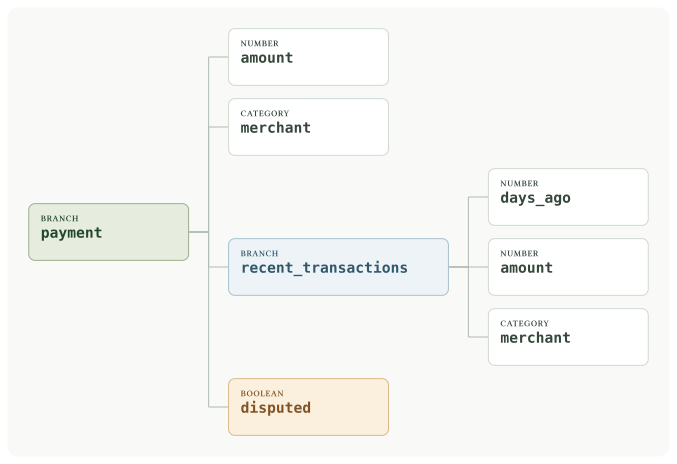
Describe The Collection With A Branch
import relflow as rf

model = rf.Model.xs(
    amount=rf.Number,
    merchant=rf.Category,
    recent_transactions=rf.Branch(
        length=32,
        overflow="tail",
        days_ago=rf.Number,
        amount=rf.Number,
        merchant=rf.Category,
    ),
    disputed=rf.Boolean(mask=True),
)
Branch describes a collection of records with the same fields. This branch keeps at most 32 transactions; overflow="tail" retains the last 32 in the supplied order. The model combines their information with the current payment’s amount and merchant to predict disputed.
Use The Same Training Steps
Train this new model with the history present in each record. Here, train_payments and validation_payments are application-supplied Arrow tables with the nested structure shown above:
data = rf.ArrowDataModule(
    model=model,
    train=train_payments,
    validate=validation_payments,
)
model.fit(data, batch_size=128, max_epochs=20)
Prediction requests have the same structure and omit disputed. The call remains model.predict(new_payments, batch_size=256).
If your source uses different names or shapes, continue with Binding Data. To prepare these histories from transaction tables, see Preprocessing.