Getting Started
Build a model that reads a customer’s purchase history and predicts churn and next month’s spending. Install the package with uv add relflow (Python 3.12+).
One Customer Record
customer_id: customer-42
tenure_days: 420
orders:
  - age_days: 3
    line_items:
      - sku: A12
        quantity: 2
      - sku: B07
        quantity: 1
churned: false
next_month_spend: 75.0
The history belongs to the observation window; the two labels describe the following month. This is one illustrative record, not a training dataset.
Describe Its Structure
import relflow as rf

model = rf.Model(
    name="customer",
    d_model=128,
    n_layers=3,
    n_heads=8,
    batch_size=128,
    embed=True,
    tenure_days=rf.Number,
    orders=rf.Branch(
        length=64,
        overflow="tail",
        age_days=rf.Number,
        line_items=rf.Branch(
            length=16,
            sku=rf.Category(size=8192),
            quantity=rf.Number,
        ),
    ),
    churned=rf.Boolean(mask=True),
    next_month_spend=rf.Number(mask=True),
)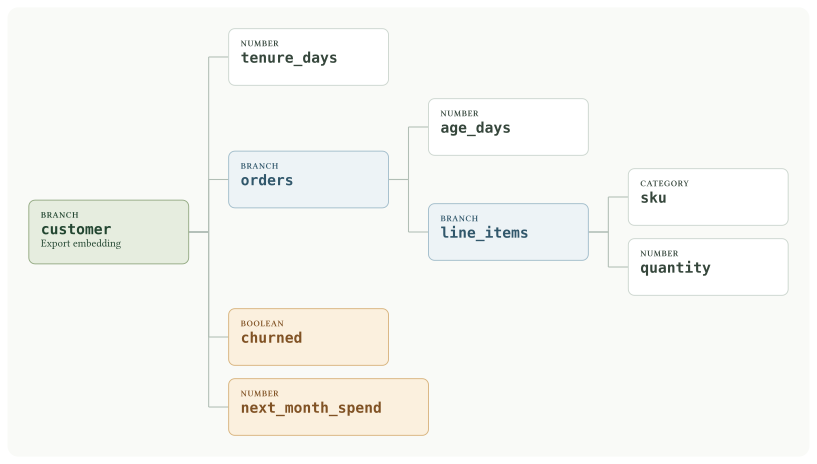
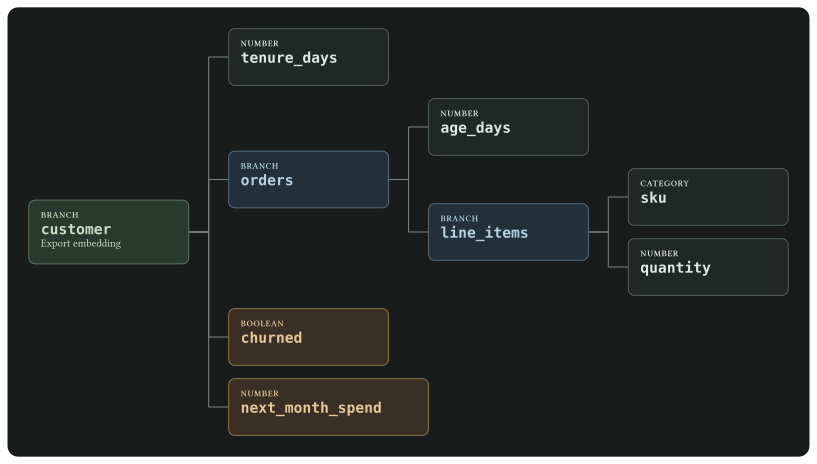
Parent keywords name the fields. The root name, customer, prefixes output addresses; it does not add a wrapper around the input record.
mask=True keeps a target out of the encoder while retaining its value for supervised learning. embed=True exports the root representation; it adds no objective. overflow="tail" keeps recent orders only if the application has already sorted them oldest to newest. See Model Tree.
Stream Parquet Datasets
Prepare independent training and validation splits with the same nested structure. Each directory below contains the application’s Parquet files; each row is one customer observation:
import pyarrow.dataset as ds

data = rf.ArrowDataModule(
    model=model,
    train=ds.dataset("warehouse/train", format="parquet"),
    validate=ds.dataset("warehouse/validation", format="parquet"),
)
Arrow datasets read batches from disk on demand. relflow opens a fresh scan each epoch, shuffles training through a bounded buffer, and forms batches of model.batch_size observations. The dataset can be larger than memory; working memory depends on scan batches, shuffle buffering, and the size of nested records.
Choose the splits and label windows before training, and keep a consistent nested Arrow schema across files. Use partition-scoped Polars preprocessing for transforms on streamed batches; dataset-scoped preprocessing gathers the full split in memory. See Data Modules for other sources and Performance for loader tuning.
Train And Save
Configure an optimizer before fitting. Lightning runs the training loop; relflow supplies the typed losses and metrics.
import lightning.pytorch as lit

checkpoint = rf.RollbackCheckpoint(monitor="loss/validate", mode="min")
trainer = lit.Trainer(max_epochs=30, callbacks=[checkpoint])
trainer.fit(model=model, datamodule=data)

model.save("customer.rf")
restored = rf.Model.load("customer.rf")
The callback restores the best validation checkpoint at fit end. See Training for checkpoint and resume behavior.
Stream Predictions To Parquet
Request files keep customer_id and the visible history, and omit churned and next_month_spend. Write each prediction batch directly to Parquet:
prediction_data = rf.ArrowDataModule(
    model=restored,
    predict=ds.dataset("warehouse/requests", format="parquet"),
    retain=("customer_id",),
)
predictor = lit.Trainer(devices=1, callbacks=[rf.Writer("predictions")])
predictor.predict(
    model=restored,
    datamodule=prediction_data,
    return_predictions=False,
)

predictions = ds.dataset("predictions", format="parquet")
return_predictions=False keeps Lightning from accumulating results in memory. The output remains a file-backed Arrow dataset. Its inputs column retains customer_id for joining results, and its predictions column contains customer/churned, customer/next_month_spend, and the exported customer embedding. See Prediction Output for their shapes and Batch Inference for output shards and distributed jobs. For small interactive requests, restored.predict(request_table) returns an in-memory Arrow table.